


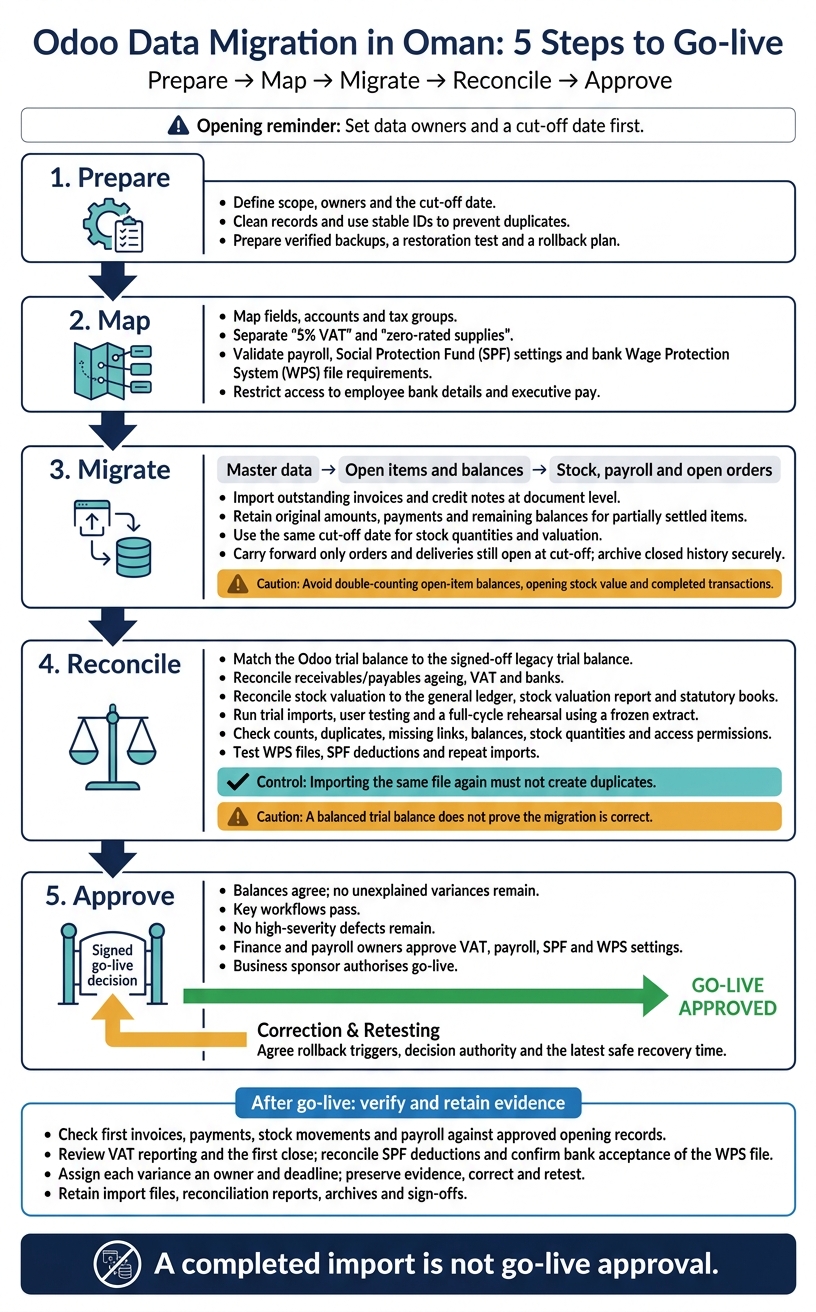
Odoo data migration in Oman needs five steps: prepare, map, migrate, reconcile and approve. Set data owners and a cut-off date first. Go live only when balances match, tests pass and business owners sign off – not when the upload finishes.
The work covers:
- Data preparation: clean records, map fields and use stable IDs to prevent duplicates.
- Finance and VAT: transfer open invoices and balances, check Oman’s 5% VAT treatment and reconcile tax records.
- Stock and payroll: verify quantities, costs, employee balances, SPF settings and bank WPS files.
- Testing and cutover: rehearse imports, check access, prepare backups and agree a rollback plan.
- After launch: check live transactions, resolve differences and retain archives and approval records.
Odoo Data Migration in Oman: 5 Steps to Go-live
Mastering Data Migration in ODOO: Organize and Optimize
sbb-itb-55910af
Migrate Finance Data, VAT and Opening Balances
Before loading finance data, check that Odoo’s accounting setup supports Oman VAT and current e-invoicing rules. Load master data first, followed by open items and balances.
Transfer the Chart of Accounts, Customers and Suppliers
Start with the accounting structure, then import customer and supplier master records. Update the chart of accounts to meet Omani tax review requirements.
Import outstanding invoices and credit notes at document level to retain ageing and settlement details. For partially settled items, record the original amount, payments and remaining balance. Exclude those balances from the opening journal to avoid double-counting.
Set Up Oman VAT Codes and Reports
Map supplies taxed at 5% and those on the updated zero-rated list to separate Odoo tax groups. Then reconcile VAT records against filed returns and supporting evidence.
Import and Reconcile Opening Balances
Set the opening date using the approved closing trial balance. Check that the Odoo trial balance matches the signed-off legacy trial balance. Include bank balances and outstanding bank items. Reconcile employee liabilities rather than automatically transferring legacy SPF liabilities.
Use the reconciliation register for every trial import to record balances, variances and sign-off. A balanced trial balance does not prove the migration is correct. Resolve unexplained differences before approval, including any balance in the migration clearing account. Reconcile each trial import against the signed-off closing position, not just the general ledger.
| Control | Legacy balance | Odoo balance | Variance | Resolution required | Approval |
|---|---|---|---|---|---|
| Trial balance | Approved closing balances | Opening balances by account | Account-level difference | Correct omitted, duplicated or misclassified entries | Finance Manager |
| Receivables and payables ageing | Open items by partner and due date | Ageing and control accounts | Document and total differences | Correct residuals, dates and payment allocations | Receivables/payables owners |
| VAT | VAT ledger and filed returns | Tax accounts and report totals | Declared and undeclared differences | Remove duplicate reporting; document timing items | VAT lead |
| Banks | Ledger, statements and outstanding items | Bank ledger and reconciliation | Ledger and statement differences | Trace uncleared payments and deposits | Treasury owner |
Migrate Stock, Payroll and Open Orders
Once finance and VAT data are loaded, move the data used to manage stock, payroll and fulfilment.
Check Stock Quantities and Valuation
After setting finance balances, migrate stock quantities, locations, lots/serial numbers and valuation using the same cut-off date. For free-zone activity, retain the location and activity data needed for exemption claims.
Do not duplicate the opening stock value in opening stock accounts. Reconcile stock valuation against the general ledger, stock valuation report and statutory books.
Transfer Payroll and Employee Data Securely
Next, transfer employee master data, employment dates, departments, pay structures, deductions, bank details, Omanisation fields and leave balances. Restrict access to this data, particularly bank details and executive pay.
Ensure the migrated payroll meets Social Protection Law requirements, and test the WPS file against the format required by Omani banks.
Carry Forward Open Orders and Archive History
Carry forward only sales orders, purchase orders, deposits and outstanding deliveries that remain open at cut-off. Use outstanding quantities to avoid duplicating completed stock movements, invoices or VAT.
Keep closed stock, payroll and order records in a restricted, searchable archive.
Test and Approve the Migration Before Go-live
Run Trial Imports, User Tests and a Rehearsal
Once the core data is loaded, test the migration before cutover. Run a full-cycle rehearsal using a frozen extract. Then ask finance, stock and payroll owners to complete user testing in Odoo.
Check record counts, duplicates, missing links, opening balances and stock quantities. Acceptance checks must cover VAT mapping against updated tariff codes, WPS file generation, Social Protection Fund deductions, access permissions and repeat imports. Importing the same file again must not create duplicates. Retest corrected records too.
Keep a testing matrix with each check, its expected and actual results, evidence and approver. Set clear acceptance criteria: every record accounted for, no unexplained variances and all critical workflows passed. Log each defect with its severity, owner, corrective action and retest result. Time a rehearsal of the full import sequence to check that it fits the cutover window.
Manage the Final Cutover
Use the rehearsal results to finalise the cutover plan. For each task, record the owner, start time, dependency and sign-off in a cutover checklist. Include verified backups, a restoration test, staged imports and reconciliation after each stage. Track post-freeze changes so they are imported once – not missed or duplicated.
Finance must approve the final VAT mapping against Oman Tax Authority Decisions 223, 224 and 225 of 2026, effective 1 October 2026.
Go-live needs a signed decision. It should never happen automatically. The business sponsor should authorise it only when balances agree, key workflows pass and no high-severity defects remain.
Agree the rollback triggers, who can make the decision and the latest safe recovery time. Set out how post-launch transactions will be preserved, reconciled and re-entered if recovery is needed. Restoring a backup alone is not enough.
Reconcile Results After Go-live
After go-live, reconcile live data against the approved opening position. Check the first invoices, payments, stock movements and payroll run against approved opening reports and ledger entries. Review VAT reporting and the first close. Reconcile Social Protection Fund deductions and confirm that the bank has accepted the WPS file.
Give each variance an owner and a deadline. Preserve the evidence before making corrections, find the root cause and retest the process. Keep import files, reconciliation reports and sign-offs. Record business-owner acceptance only when every migration issue has been resolved or formally accepted with documented controls.
Conclusion: Approve Reconciled Data Before Go-live
Before go-live, sign off the full approval pack: scope, owners, mappings, document-level open items, reconciled opening balances, stock reconciliations and user acceptance test results. A completed import is not go-live approval. Finance and payroll owners must approve VAT, payroll, SPF and WPS settings, and document controls for any remaining exceptions.
If you need implementation support, choose a team that can handle preparation, testing and sign-off.
Migration Support from AOWJ Business Consultants
AOWJ Business Consultants is a Muscat-based advisory firm offering Odoo ERP implementation and migration-related accounting support.
Define the migration scope, covering data assessment, account mapping, opening balances, reconciliation, user acceptance testing and post-go-live accounting support. Put deliverables, responsibilities and approval evidence in writing before work starts.
Need help with your Odoo migration or ERP setup? AOWJ’s ERP, Odoo and digitalization services cover it from start to finish. Contact us for a consultation and a clear quote.
FAQs
How long will our Odoo data migration take?
Odoo data migration timelines depend on the complexity of your records, the volume of data and the modules you’re implementing. AOWJ Business Consultants reviews your needs, including opening balances, your chart of accounts, historical stock and payroll data. We also consider your financial position and regulatory requirements.
Contact our Muscat-based team for a consultation and a tailored project roadmap that fits your company’s day-to-day requirements.
How much historical data should we migrate?
Balance access to historical records with system performance. Most organisations migrate opening balances for the current financial year, along with active master data such as customer, supplier and stock records. Keeping at least one full prior year of transactions is often recommended to support comparative reporting and year-on-year analysis.
Older records are usually best archived in a legacy system or external database. This keeps them accessible without slowing down Odoo.
Can we migrate mid-year without disrupting VAT reporting?
Yes, with careful planning. Your VAT codes and opening balances must be mapped accurately into Odoo. Tax mapping must meet current Oman Tax Authority requirements, and quarterly VAT returns covering the period before migration must be reconciled.
AOWJ Business Consultants handles the technical migration and testing to keep your VAT reporting uninterrupted throughout the move.