


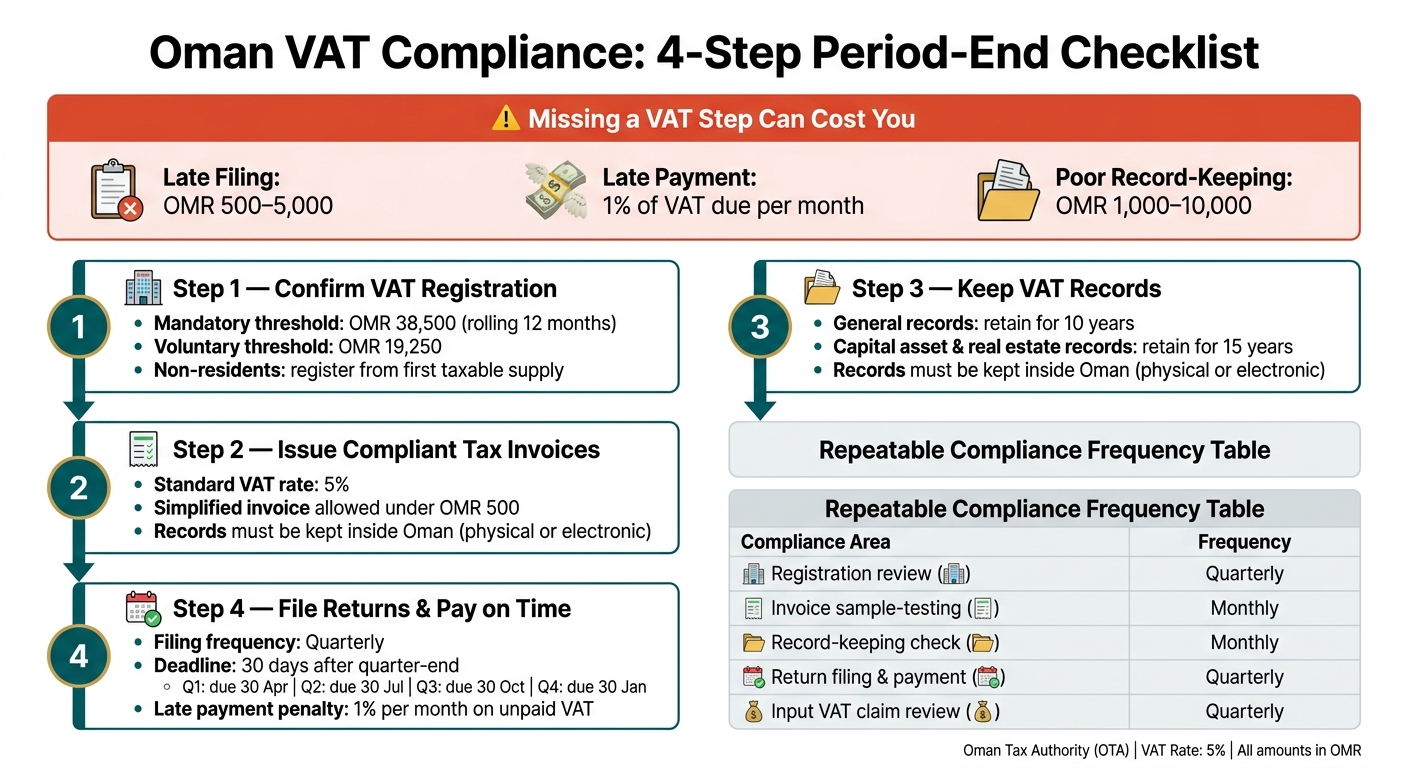
If I miss one VAT step in Oman, the cost can add up fast: late filing can lead to OMR 500–5,000 in penalties, late payment adds 1% of VAT due for each month or part of a month, and poor record-keeping can mean OMR 1,000–10,000 in fines.
If I had to boil this guide down, I’d keep my eye on five checks:
- Registration: confirm if taxable supplies have passed OMR 38,500 in any rolling 12 months, or if OMR 19,250 puts voluntary registration on the table.
- Invoices: make sure each tax invoice has the right dates, VAT number, values, and 5% VAT where it applies.
- Records: keep invoices, ledgers, customs papers, and support files in order for 10 years, and some asset records for 15 years.
- Returns and payment: file and pay within 30 days after each quarter-end.
- Input VAT: only claim VAT when I have the right invoice and proof the cost links to taxable business activity.
This article is, at heart, a working period-end checklist. It shows me what to review, what to keep on file, and where mistakes usually happen, so I can check registration data, invoice controls, record storage, input VAT support, and quarterly filing before a small issue turns into a fine.
Oman VAT Compliance Checklist: 4 Key Steps & Penalties
Step 1: Confirm and Maintain VAT Registration in Oman
Use this step to check your VAT registration status, pull together the right paperwork, and keep your registration details up to date. Do this before you sort out invoice design, record-keeping, and return filing.
Turnover Assessment Checklist
Resident businesses must register for VAT when taxable supplies exceed, or are expected to exceed, OMR 38,500 in any rolling 12-month period. That means using both a backward-looking test and a forward-looking test.
- ☐ Taxable supplies for the rolling 12 months calculated
- ☐ Forecast taxable supplies for the next rolling 12 months prepared
- ☐ Taxable supplies or taxable expenses reach OMR 19,250 in a rolling 12-month period → voluntary registration available
- ☐ Exempt supplies, such as residential property leasing and certain financial services, excluded from the calculation
- ☐ Non-business income excluded from the calculation
- ☐ Month of first threshold breach recorded for registration deadline tracking
- ☐ Non-resident businesses: register from the first taxable supply if they must account for VAT in Oman and no other person is required to do so
Documents to Prepare Before VAT Registration
Put these documents into one registration file for the Oman Tax Authority portal:
| Document Category | What to Include |
|---|---|
| Legal identity | Commercial Registration (CR) certificate, trade or sector-specific licence |
| Constitutional documents | Memorandum and Articles of Association, partnership agreements |
| Ownership and signatories | Civil ID or passport copies of owners, directors and authorised signatories |
| Business address | Lease agreement or property ownership document for the principal place of business |
| Bank details | Omani bank account details, including bank name, account number and IBAN |
| Turnover evidence | Last 12 months’ sales summaries, financial statements or management accounts, and key contracts |
If the business has corporate shareholders, also collect the parent company’s CR, board resolution, and attested incorporation documents.
For non-resident applications, the process is usually handled by email. You’ll need the details of your Oman-resident responsible person, proof of their appointment, and a bank guarantee worth at least 5% of expected annual taxable supplies.
Before you submit anything, make sure your 12-month turnover figures match your accounting records. Also check that every attachment is clearly labelled and that the right activity codes have been picked on the portal form.
Once registration is approved, move on to invoice controls and record-keeping.
Ongoing Registration Review Points
Go through these points after every structural or ownership change:
- ☐ Rolling 12-month taxable supplies recalculated and compared against both thresholds
- ☐ Legal form unchanged, or the Tax Authority notified of any conversion, such as a sole proprietorship to an LLC
- ☐ Shareholder or signatory changes reflected in the portal after any CR amendment
- ☐ New branches added to the registration; closed branches removed
- ☐ Material changes in business activity, such as adding e-commerce or import/export operations, notified
- ☐ Merger, acquisition or cessation of business reported and deregistration procedure initiated if applicable
- ☐ Contact email, phone number and postal address tested and confirmed current in the portal
Keep the portal updated whenever anything changes. If your details are out of date, notices can end up at the wrong address and deadlines can slip by. Those registration details also feed straight into your invoice data, records, and return filing.
sbb-itb-55910af
Step 2: Issue Compliant VAT Tax Invoices
Once your VAT registration is confirmed and your portal details are current, the next risk point is the invoice itself. One missing detail, such as no VAT registration number, the wrong date, or an incorrect VAT total, can cause the invoice to be rejected. It can also create trouble for your customer’s input VAT claim or lead to penalties from the Oman Tax Authority (OTA). The standard VAT rate is 5%, so the maths needs to be clear. After that, the focus shifts to evidence: corrections, records, and support for input VAT.
VAT Invoice Fields to Check Before Sending
Every tax invoice must be clearly marked Tax Invoice and include a unique sequential invoice number. If a number is voided, keep it on file. OTA validation rules also check for duplicate invoice numbers and invalid date formats, so this is not something to leave until the last minute.
Use this checklist before sending any invoice:
- ☐ Document title is Tax Invoice
- ☐ Supplier details are correct: legal name, postal address, Commercial Registration number, and VAT registration number match your records
- ☐ Invoice number is unique and sequential; keep any voided numbers on file
- ☐ Invoice date and supply date, where different, are included and shown in day–month–year format, for example 30 September 2026
- ☐ Customer details are included: legal name, address, and VAT registration number for VAT-registered customers
- ☐ Each line item shows description, quantity, unit price excluding VAT, VAT rate, and VAT amount in OMR
- ☐ Zero-rated or exempt supplies are clearly identified
- ☐ Show subtotal, total VAT and total payable in OMR
- ☐ If the invoice is in a foreign currency, the OMR equivalent is shown for VAT reporting, together with the exchange rate used
- ☐ For goods, the correct 12-digit GCC Unified Tariff (HS) code is included on each relevant line
- ☐ For supplies under OMR 500, a simplified invoice may be used, but it still needs the supplier VAT number, date, description, total amount, and VAT amount
Here’s a worked example of a compliant invoice:
| Field | Example |
|---|---|
| Supplier | Al Noor Trading LLC, VAT No. 123456789 |
| Customer | Gulf Services SAOC, VAT No. 987654321 |
| Invoice No. | INV-2026-0457 |
| Invoice Date | 30 September 2026 |
| Supply Date | 28 September 2026 |
| Currency | OMR |
Line item
IT Support Services – September 2026: 1 × OMR 1,000.00 at 5% = OMR 50.00 VAT; line total OMR 1,050.00
| Total | Example |
|---|---|
| Subtotal (excl. VAT) | OMR 1,250.00 |
| Total VAT | OMR 62.50 |
| Amount Payable (incl. VAT) | OMR 1,312.50 |
Credit Notes, Debit Notes and Invoice Corrections
If a price changes, goods are returned, or you find an invoicing error, issue a credit note or debit note. Each correction document should point back to the original tax invoice number and date, explain why the change was made, and show the net change in taxable amount and VAT.
Use this checklist for every correction:
- ☐ Reason for adjustment confirmed and evidenced, for example by email, a return note, or a revised contract
- ☐ Correction document references the original invoice number and date, for example: Credit Note CN-2026-010, relating to Invoice INV-2026-0457 dated 30 September 2026
- ☐ Net change in taxable amount and VAT shown clearly in OMR
- ☐ Adjustment posted to the correct VAT return period in your accounting system
- ☐ Tax code updated to reflect the original supply type: standard-rated, zero-rated, or exempt
- ☐ Correction document sent to the customer promptly so they can update their own VAT records
- ☐ File the original invoice, correction note, correspondence and approval together
A simple habit helps here: keep each correction with the original invoice. That makes record-keeping and VAT return review much easier.
Internal Pre-Issue Review Controls
The best control is a second-pair-of-eyes review before any invoice goes out. A separate reviewer should check the customer’s VAT status, confirm that the right VAT rate has been applied to each line, test the arithmetic, and make sure the invoice date falls within the correct quarterly VAT period.
In your ERP, set rules to block invoice posting if mandatory fields are blank, calculate VAT automatically from the assigned tax code, and stop invoices that fall outside the VAT period or show unusual VAT rates. For an invoice dated 30 September 2026, for example, the reviewer should confirm that it falls within the Q3 period and that both VAT registration numbers match the master records.
These checks create the audit trail needed for records and input VAT claims. They also help cut errors when you reconcile figures and file your VAT return.
Step 3: Keep VAT Records and Support Input VAT Claims
Once tax invoices are issued correctly, the next job is record-keeping. Every VAT claim and every figure in the VAT return should tie back to records you can produce fast if the OTA asks for them. That means keeping daily transaction records in date order and linking each entry to the supporting documents behind it.
Core VAT Records to Keep
VAT-registered businesses must keep records that support VAT calculations and VAT return filings. This includes daily transaction records, the general ledger, inventory records, import and export files, customs declarations, intra-GCC supply records, evidence for zero-rated supplies, and all tax invoices issued or received.
| Record Type | Examples | Retention Period | Storage Location |
|---|---|---|---|
| Sales & Purchase Records | Tax invoices issued and received, credit notes, debit notes, receipts, daily transaction logs | 10 years | Registered office / secure digital archive |
| VAT Ledgers | Input tax records, output tax records, general ledger, VAT account, supporting schedules | 10 years | Accounting software / secure archive |
| Inventory Records | Stock counts, inventory schedules, item listings | 10 years | Accounting software / office |
| Import & Export Documents | Commercial invoices, packing lists, bills of lading, airway bills, certificates of origin | 10 years | Secure digital archive / physical files |
| Customs Records | Customs declarations, customs code registration, Bayan account details | 10 years | Office / digital portal |
| Capital Asset & Real Estate Records | Purchase invoices for machinery, property, or vehicles | 15 years | Registered office / secure digital storage |
| Financial Statements & Filed Returns | Audited accounts, bank statements, filed VAT returns | 10 years | Office / secure digital storage |
| Contracts & Agreements | Lease agreements, service contracts, purchase orders | 10 years | Office / legal department |
These records flow straight into the quarterly reconciliation and return review.
Retention Periods and Storage Controls
The general rule is simple: keep all VAT records for at least 10 years after each tax period. Capital asset and real estate records may need to be kept for up to 15 years. It helps to track retention by document set and keep a written disposal policy, so nothing is removed too early.
Records must be kept inside Oman, either in physical form or electronically, as long as the electronic setup meets the regulatory conditions and the records can be produced promptly on request. In day-to-day terms, that usually means indexed digital storage, access controls, backup copies, and a clear file naming rule. A file name such as INV-2026-0457_30Sep2026 makes it much easier to match a document to the right VAT period.
Each month, reconcile the VAT ledger to the general ledger. Check that output VAT, input VAT, adjustments, and closing balances all match. If something doesn’t line up, deal with it in the same period, document the fix, and don’t let it drift into the next return. A finance sign-off before filing gives you a clear audit trail.
Input VAT Documentation and Review Checklist
To claim input VAT, the OTA expects a valid tax invoice, proof that the expense relates to a taxable business activity, and payment evidence where needed, such as a bank statement or remittance advice. For imports, you also need customs declarations and proof of import payment, linked back to the purchase order, invoice, and VAT ledger entry.
The table below shows the main input VAT risk areas, along with the documents and checks that help support each claim.
| Risk Area | Required Documents | Control Check |
|---|---|---|
| Missing tax invoice | Valid VAT invoice from supplier | No claim posted until the invoice is uploaded and matched to the purchase order |
| Invoice made out to the wrong entity | Invoice addressed to the correct legal entity | Supplier master data validated before booking the expense |
| Mixed-use or non-business expense | Business purpose confirmed in writing | Pre-claim checklist and senior finance review for unusual or high-value costs |
| Import VAT without customs evidence | Customs declaration, import payment evidence, Bayan declaration | Monthly match between customs entries and the VAT ledger |
| Claims on exempt or non-business costs | Supply classification confirmed | Pre-claim checklist and senior finance review; exempt costs excluded from the input VAT schedule |
A quarterly review of high-value input VAT claims is a smart control. Before each return is filed, check that every file is complete and easy to follow. That file pack then becomes the working set for the quarterly VAT return review in Step 4.
Step 4: File VAT Returns and Pay VAT on Time
Once your records are squared away and your input VAT pack is ready, the next job is simple in theory: file the return and pay on time every quarter. In practice, this is where small slips can cost money, so it helps to have a set routine.
Quarterly VAT Filing Calendar
For most VAT-registered businesses in Oman, VAT periods follow the calendar year on a quarterly basis: 1 January–31 March, 1 April–30 June, 1 July–30 September, and 1 October–31 December. Each VAT return must be filed, and any net VAT due must be paid, no later than 30 days after the end of the tax period. If the deadline lands on a weekend or public holiday, it moves to the next working day.
| Quarter | Tax Period | Return and Payment Due Date |
|---|---|---|
| Q1 2026 | 01 January 2026 – 31 March 2026 | 30 April 2026 |
| Q2 2026 | 01 April 2026 – 30 June 2026 | 30 July 2026 |
| Q3 2026 | 01 July 2026 – 30 September 2026 | 30 October 2026 |
| Q4 2026 | 01 October 2026 – 31 December 2026 | 30 January 2027 |
A good habit is to set internal reminders two to three weeks before each deadline. Make the diary entry plain and specific, such as "VAT Q3 2026 – Return and Payment due 30 October 2026." It sounds basic, but clear labels save time when the quarter-end rush kicks in.
Pre-Filing Reconciliation Checklist
Use the period folder from Step 3 as your source pack. Before going into the portal, check the quarter against your accounting records and make sure each figure can be traced back to the support already pulled together.
Start with output VAT. Match VAT on taxable supplies to the sales ledger and general ledger. Then review exports, reverse-charge supplies, and any other items that have a different VAT treatment against the invoices and contracts behind them. Exempt supplies need extra care here. They should be marked correctly, and no VAT should have been charged on them.
Next, review input VAT. Reconcile the total claim to the purchase ledger, supplier invoices, and import papers. Strip out any VAT that cannot be recovered, such as amounts linked to exempt activities, before the return is filed.
Then check credit notes and debit notes. Every note issued or received in the period should feed into the output or input VAT figures, and each one should point back to the original invoice. If that link is missing, it can turn into a headache later.
Finally, reconcile the VAT control account in the general ledger to the net VAT payable or refundable on the draft return. This step is your final sense-check. If the numbers don’t line up here, something upstream usually needs another look.
Keep the reconciliation in a spreadsheet and save it in that period’s VAT file, for example "VAT Q3 2026". That way, it’s ready for internal review and for any future Tax Authority query.
Return Submission and Payment Confirmation
Once the reconciliation ties, move straight to filing and payment. VAT returns are submitted online through the Oman Tax Authority portal. Log in with your taxpayer credentials, open VAT Returns, choose Add New Return for the right period, and enter the figures from your reconciliation workings.
Before you hit submit, get a second pair of eyes on it. A finance manager should compare the totals shown in the portal with the internal VAT summary sheet. If both match, select Submit and save the confirmation page and reference number straight away.
Payment must be made in Omani Rials (OMR) by the same deadline as the return. Don’t leave the bank transfer until the last minute. Interbank payments don’t always clear on the same day, so it’s smart to send the payment a few days early. Add your VAT registration number and tax period to the payment reference, then save the bank transfer confirmation or official receipt as soon as the payment clears. A file name like "Q3 2026 VAT – Due 30 October 2026, Paid 27 October 2026" works well.
Missing the payment deadline can get expensive. Late payment attracts 1% per month or part thereof on unpaid VAT. Deliberate under-declaration can lead to fines of up to OMR 20,000 and, in serious cases, imprisonment. That’s why a clear quarterly process matters. When the preparer, reviewer, and approver each know their role, the whole job becomes far less messy.
Conclusion: VAT Compliance Checks to Repeat Every Period
VAT compliance in Oman is not a once-a-year job. It needs to sit inside your normal close cycle and be checked period after period.
This checklist covers five areas: registration, invoicing, record-keeping, return filing, and input VAT documentation. Each one brings its own penalty risk if it’s missed. If problems stack up, serious non-compliance can even lead to criminal sanctions. The practical fix is simple: build VAT checks into your month-end and quarter-end close.
Treat VAT as part of the monthly close. Then, before filing, run a full quarterly reconciliation. That approach only works when records are complete, searchable, and backed up.
Record-keeping also needs its own control. Files should be securely indexed and backed up, so you can retrieve them when needed without a scramble.
Use the summary below as a repeatable control sheet.
| Compliance Area | Repeatable Check | Frequency |
|---|---|---|
| Registration | Confirm the TRN and portal details are current | Quarterly |
| Invoicing | Sample-test tax invoices for mandatory fields; review credit and debit notes | Monthly / per period |
| Record-keeping | Confirm records, inventory and import/export files are complete and accessible | Monthly |
| Return filing | Reconcile the return to the ledger; file and pay on time | Quarterly |
| Input VAT | Match claims to valid support; exclude ineligible costs | Quarterly |
Clear ownership for the preparer, reviewer, and approver helps cut errors and eases pressure.
Need help with VAT registration, returns and compliance? AOWJ’s tax advisory and VAT services cover it from start to finish. Contact us for a consultation and a clear quote.
FAQs
Do all businesses in Oman need to register for VAT?
No. VAT registration in Oman is only mandatory when a business’s annual taxable supplies go above OMR 38,500.
If a business has annual taxable supplies or expenses of more than OMR 19,250, it can register voluntarily instead. That can help the business recover input VAT.
What happens if I file or pay VAT late in Oman?
If you file or pay VAT late in Oman, you may face penalties.
VAT returns must be filed every quarter, within 30 days of the end of that quarter. To help avoid penalties and possible audit issues, make sure you submit the return and pay the VAT due within this legal deadline.
Can I reclaim input VAT without a proper tax invoice?
No. You can’t reclaim input VAT without a valid tax invoice that meets Oman Tax Authority rules.
Good record-keeping matters for compliance. If invoices are missing or wrong, you can run into filing mistakes and audit problems. Keep your documents in line with local rules to support your VAT return claims.